
Getting the client's IP in the cloud: an example in Elixir
How to correctly identify client IPs when your Elixir application is running behind a load balancer.
A misconfigured rate limiter can be worse than no rate limiter. It gives you a false sense of confidence, while letting malicious users silently spoof their own IP address.
This is surprisingly easy to get wrong in a cloud environment. Your server sees the IP of the last network node, which is the load balancer, not the real user. The proxy (AWS ALB, Nginx, Cloudflare) forwards the original client IP in the X-Forwarded-For header, but you have to parse it yourself, and getting it wrong makes IP spoofing possible.
None of the techniques below work if your origin is reachable from the public internet without a load balancer or reverse proxy, because an attacker can just pass their own header.
Where is the client’s IP#
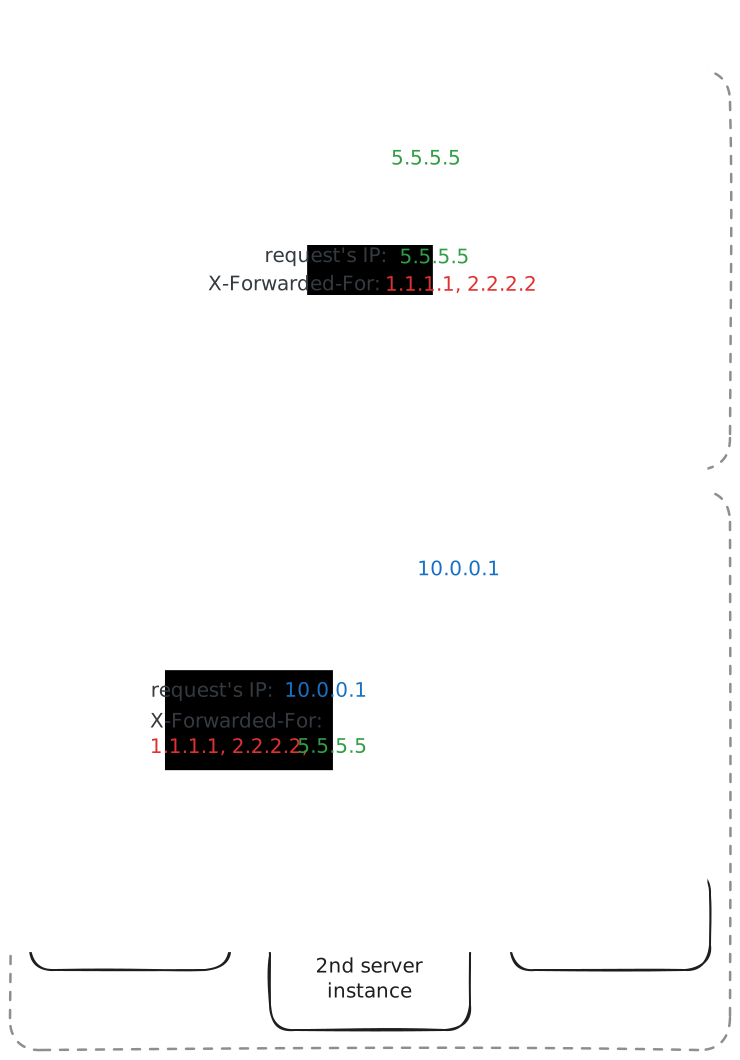
The X-Forwarded-For (XFF) header typically has the following form: let’s say the real client’s IP is 5.5.5.5 and the request passes through a load balancer (LB) with internal address 10.0.0.1. The user can add two fake IPs in their own XFF header before sending the request: 1.1.1.1 and 2.2.2.2, for example with a curl command like this:
curl https://yourapp.com/login \
  -H "X-Forwarded-For: 1.1.1.1" \
-H "X-Forwarded-For: 2.2.2.2"The HTTP specification allows repeated headers to be merged into a single comma-separated value, and most LBs do this in practice. The final header received by the server is
X-Forwarded-For: 1.1.1.1, 2.2.2.2, 5.5.5.5The first two IPs come from the user’s spoofed headers, followed by the real client’s IP.
Parsing from right to left#
Each proxy appends the network layer IP it saw the request come from to the end of XFF. The strategy is simple: parse from right to left, ignore all proxies’ CIDRs, and the first non-proxy IP is the real client’s address.
Fortunately, in single load balancer setups, the last element in X-Forwarded-For is usually the client’s IP.
| Provider | Client’s IP position in XFF | Note |
|---|---|---|
| AWS | Last | - |
| GCP | Second-to-last | Exception: last is load balancer’s IP |
| Azure | Last | App Gateway appends IP:port |
| Cloudflare | Last | Prefer CF-Connecting-IP header |
(checked in May 2026)
Multiple proxies complicate this, as covered below.
Configuration in Elixir#
The simple approach#
Assuming the user’s IP is the last XFF element, let’s create a simple function to be used in a Phoenix plug or WebSocket connection handler for extracting the right address.
def get_remote_ip(x_forwarded_for_header) do
  x_forwarded_for_header
  |> String.split(",")
  |> Enum.map(&String.trim/1)
  |> Enum.map(&to_charlist/1)
  |> Enum.map(&:inet.parse_strict_address/1)
  |> Enum.filter(fn result -> match?({:ok, _}, result) end)
  |> Enum.map(fn {:ok, ip} -> ip end)
  |> List.last()
endThis shows the mechanics, but it has a few caveats:
- returns the load balancer’s IP on GCP, because it appends the client’s IP, then its own
- can return the attacker’s IP on Azure with App Gateway, because it appends
IP:port,parse_strict_addressfails, and those entries get filtered out - breaks the moment you have more proxies
Advanced approach with remote_ip library#
There is a library named remote_ip, which has a familiar API and allows more advanced configuration, such as specifying known proxy CIDRs to ignore when parsing the XFF header. This makes both simple environments and multiple proxies cases easy to set up.
By default it looks for common headers such as X-Forwarded-For, X-Real-Ip, and X-Client-Ip.
defmodule MyApp.Router do
  use Plug.Router

  plug RemoteIp

  # ...
endAfter the plug runs, conn.remote_ip is overwritten, so rate limiters, logs, and audit trails see the real client’s IP address.
Private IP ranges are recognised as proxies by default. For more control, you can pass options:
plug RemoteIp,
  headers: ["x-forwarded-for"],
  proxies: ["192.0.2.0/24"], # optional proxy CIDRs
clients: [] # optional trusted clients (even if in proxies range)With this config, the two 192.0.2.* additional proxies’ addresses are stripped and 5.5.5.5 is set as remote_ip:
X-Forwarded-For: 1.1.1.1, 2.2.2.2, 5.5.5.5, 192.0.2.1, 192.0.2.2On GCP, configure it the same way:
plug RemoteIp,
  headers: ["x-forwarded-for"],
  proxies: [
    # GCP load balancers
    "35.191.0.0/16",
    "130.211.0.0/22"
]It handles XFF header with GCP load balancer’s address, e.g.:
X-Forwarded-For: 1.1.1.1, 2.2.2.2, 5.5.5.5, 35.191.5.10Using it in a controller#
With the plug in place, a rate limiter like Hammer can use the updated remote_ip connection’s field directly as a bucket key.
Define a rate limiter module and start it in your supervision tree:
defmodule MyApp.RateLimit do
  use Hammer, backend: :ets
endThen you can use it in your controller:
defmodule MyAppWeb.SessionController do
  use MyAppWeb, :controller

  def create(conn, _params) do
    ip = conn.remote_ip |> :inet.ntoa() |> to_string()

    case MyApp.RateLimit.hit("login:#{ip}", :timer.minutes(1), 5) do
      {:allow, _count} ->
        # ... authenticate the user
        conn |> put_status(:ok) |> json(%{ok: true})

      {:deny, _retry_after_ms} ->
        conn |> put_status(:too_many_requests) |> json(%{error: "rate limited"})
    end
  end
endThis allows 5 login attempts per minute per client IP before returning 429 Too Many Requests.
Lock down the origin#
One thing the remote_ip library and our custom function cannot solve: it’s only safe if your app is really behind the load balancer. If the origin is reachable from the public internet without a LB, an attacker can spoof their IP by passing their own X-Forwarded-For. You need to lock the origin down at the network level (security group, VPC, firewall) so that the load balancer is the only way in.
Summary#
The two main takeaways are to parse X-Forwarded-For from right to left, and to trust only what came from a load balancer or reverse proxy you control, which only works if your app is actually behind it.